

Seamless Access to IOC Management from Exception Screens

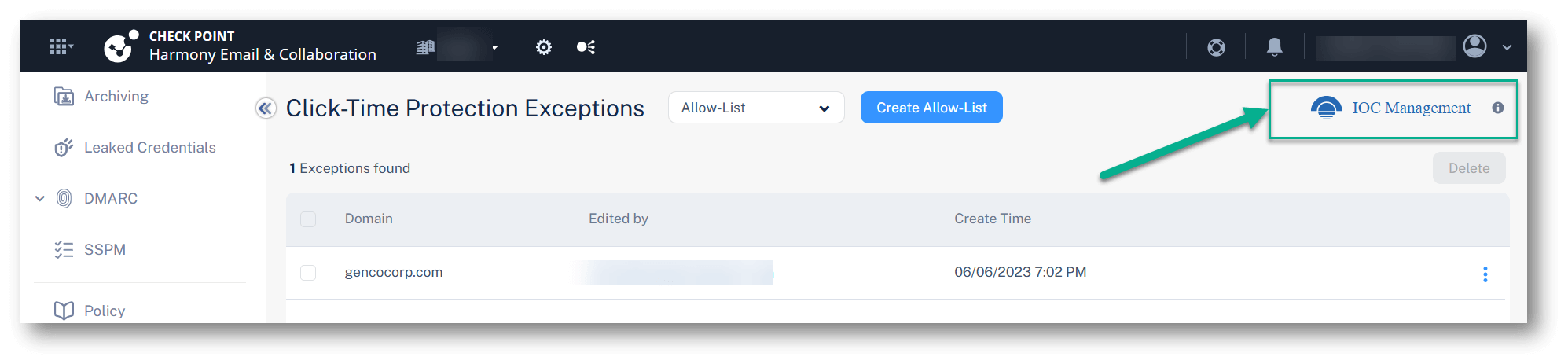
Harmony Email & Collaboration now introduces a direct link to Infinity IOC Management from within the Exceptions interface.
Previously, administrators could only access the Infinity IOC Management portal through external links in the admin guide or other Check Point products. With this update, a new shortcut is available at the top-right corner of each exception screen – such as Click-Time Protection and Anti-Phishing – providing immediate access to configure global IOCs.
This enhancement simplifies the process of connecting Harmony Email & Collaboration to live external IOC feeds or managing individual threat indicators manually. By streamlining access, SOC teams can more easily align email protections with broader threat intelligence sources, ensuring that relevant IOCs are enforced pre-delivery across their organization.
Reminder: Harmony Email & Collaboration customers do not need any additional licensing to use Infinity IOC Management.
You may also like

The Inbox Is Disappearing. Why Security Must Follow the Workspace

Check Point Blocks Large-Scale Debt-Relief Email Phishing Campaign Targeting More Than 9,000 Organizations

Attackers Are Turning Microsoft’s Trusted Login System Into Their Latest Phishing Weapon