

ClickFix: The Attack That Turns Users Into Their Own Attackers

ClickFix has quickly become one of the most prevalent social engineering techniques on the web. The attack flips a familiar security assumption on its head: instead of slipping a malicious file past endpoint defenses, the attacker convinces the victim to run the payload themselves. No exploit. No malicious attachment. Just a user, a clipboard, and a convincing prompt.
To address this growing threat, the ThreatCloud AI team built a new detection engine, now integrated into Check Point’s Gateways (Zero-Phishing Blade), Email Security and Browse Security.
The ClickFix Threat
ClickFix attacks open with a familiar-looking prompt, a fake CAPTCHA, a Cloudflare verification screen, or a “browser update required” notice. The lure is convincing because it borrows the visual language of real security checks. The pattern is always the same: the victim is presented with a convincing prompt that requires them to take a few steps on their computer to “fix” something. Those steps end with the victim opening the Windows Run dialog, pasting a command from their clipboard, and hitting Enter.
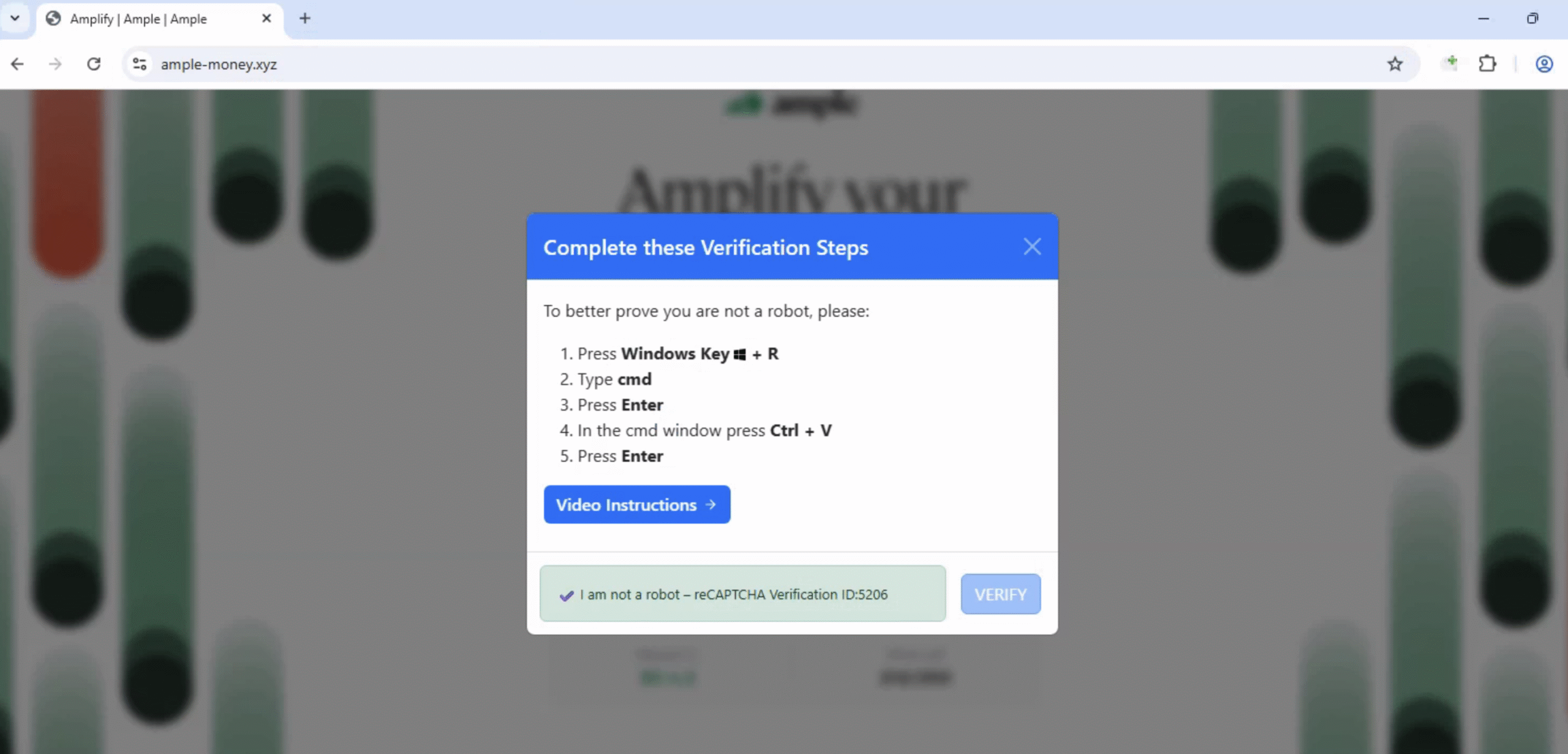
What makes this so effective is that no exploit is involved, the user runs the payload themselves. Endpoint protection tools see a command launched by explorer.exe after a manual paste, a pattern that looks indistinguishable from legitimate user activity.
Attackers deliver ClickFix through two main methods. Some create dedicated sites impersonating known brands or generic verification pages. Because the domain has no history, traditional reputation systems sometimes catch it, but only after the campaign has run for a while and signals accumulate.
Others compromise legitimate, trusted websites and inject a ClickFix overlay. In those cases, the domain is years old, has a clean reputation, and serves real content alongside the attack. Reputation-based defenses see nothing wrong, and most traditional defenses miss it.
In both cases, catching ClickFix requires looking at the page itself, at the behavioral indicators of the attack, independently of where it is hosted.
Introducing the ClickFix Engine
The ClickFix Engine is a multi-layered AI detection system that analyzes web pages for the behavioral fingerprint of a ClickFix attack. It analyzes the page’s HTML for behavioral signals: fake verification prompts, “open terminal” instructions, clipboard copy APIs, and more.
The engine operates in multiple stages. After analyzing the behavioral patterns, a deeper AI inspection layer analyzes the full-page content and identifies social engineering tactics. The result is consistent detection regardless of the host domain reputation or use of evasion techniques. Here’s what that looks like in practice.
Case Study 1 – Tax-Season Impersonation Campaign
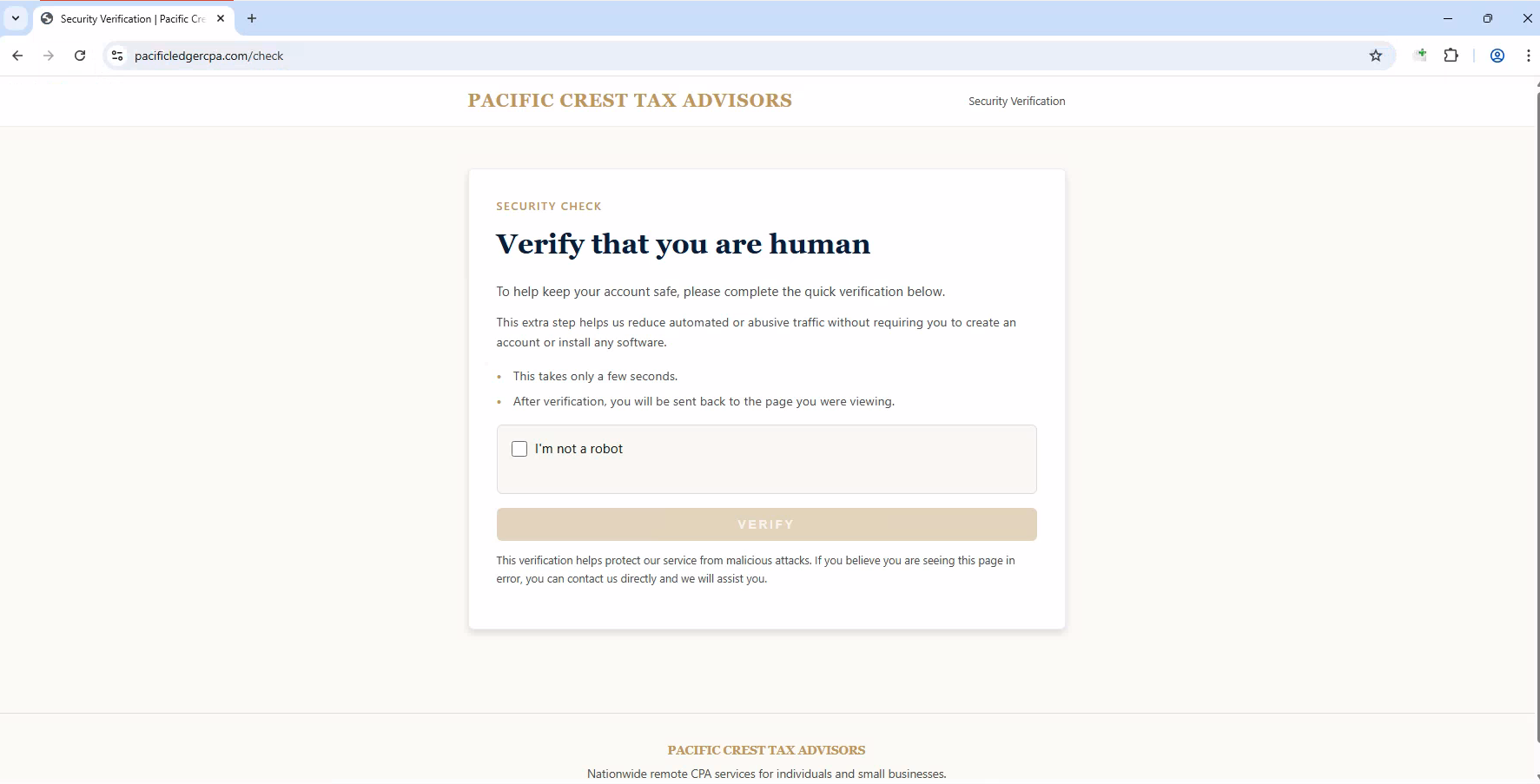
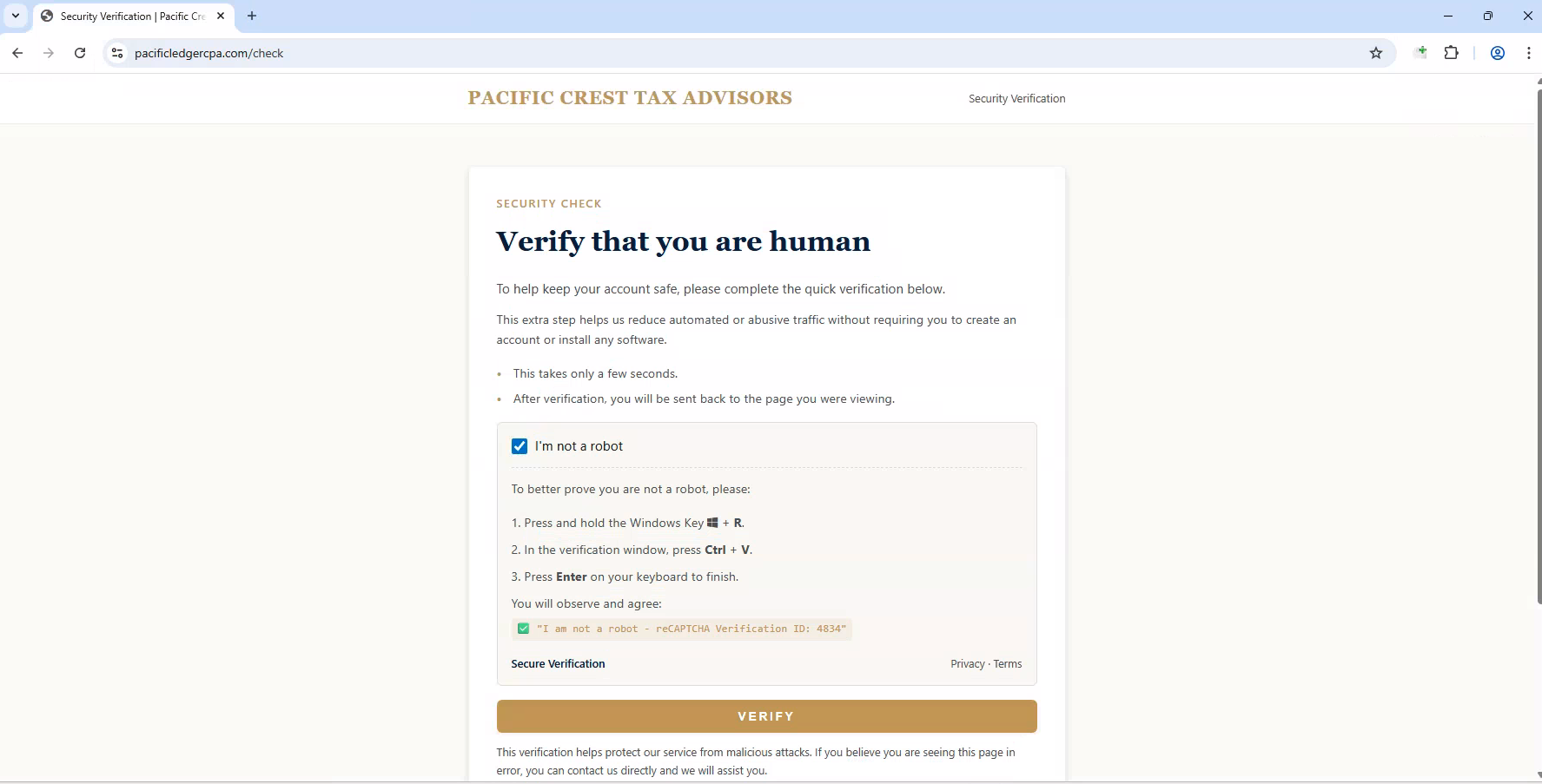
In April 2026, the engine detected a coordinated campaign of five newly registered domains, all registered within the same week, all branded as “Pacific Crest Tax Advisors”. The timing was deliberate, the campaign launched in the U.S. tax filing period, exploiting a time when IRS impersonation scams are at their peak.
The ClickFix page prompted victims to complete a “verification step”, which silently copied a multi-stage PowerShell payload to their clipboard. Pasting and running it, as the page instructed, would trigger a chain of actions: first downloading a malicious file from a trusted content delivery service, then installing it silently on the machine. The command was deliberately disguised to bypass security scanners, both using a well-known URL to download the malicious file, and the command was splitting its instructions across multiple variables to evade signature-based detection.
The ClickFix Engine caught all five domains on day zero, before any reputation signals had accumulated!
Case Study 2 – Catching ClickFix on a Trusted Website
The second case tells a different story. Same attack, very different infrastructure. In April 2026, the engine flagged two unrelated French websites: vertsport.com, a sportswear retailer active since 2007, and materlo.com, a PrestaShop shop selling automotive tools. Both had clean reputations, valid SSL certificates, and years of legitimate activity. Nothing about either site would raise a flag.
Both had been quietly hijacked. Hidden inside their product and blog pages was a fake Cloudflare verification prompt, identical on both sites, pointing to the same attacker-controlled server. Visitors who followed the “verification” steps would unknowingly run a payload that disabled Windows Defender and installed malware disguised as WebRTC driver, all while browsing what looked like a perfectly normal website.
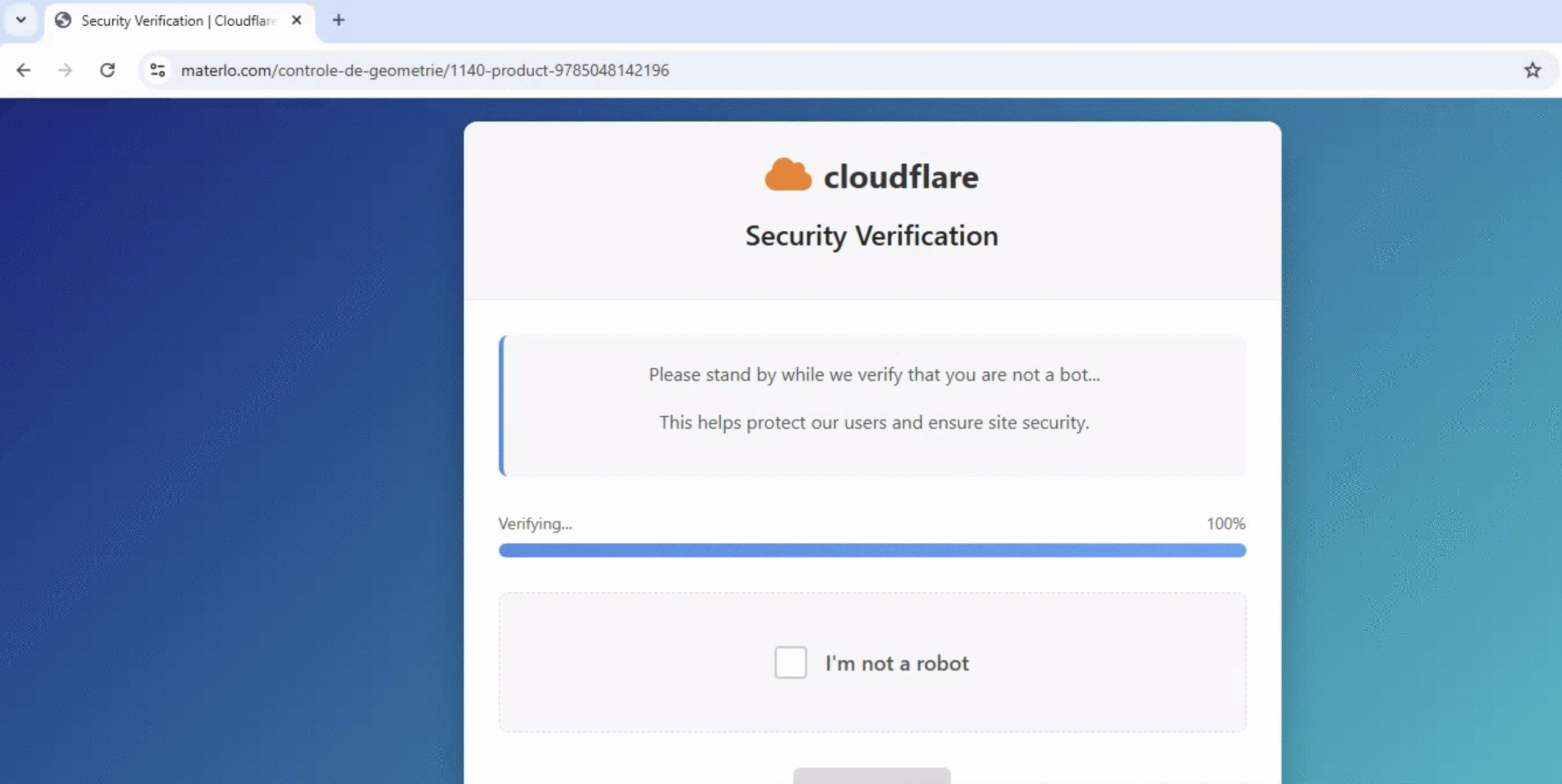
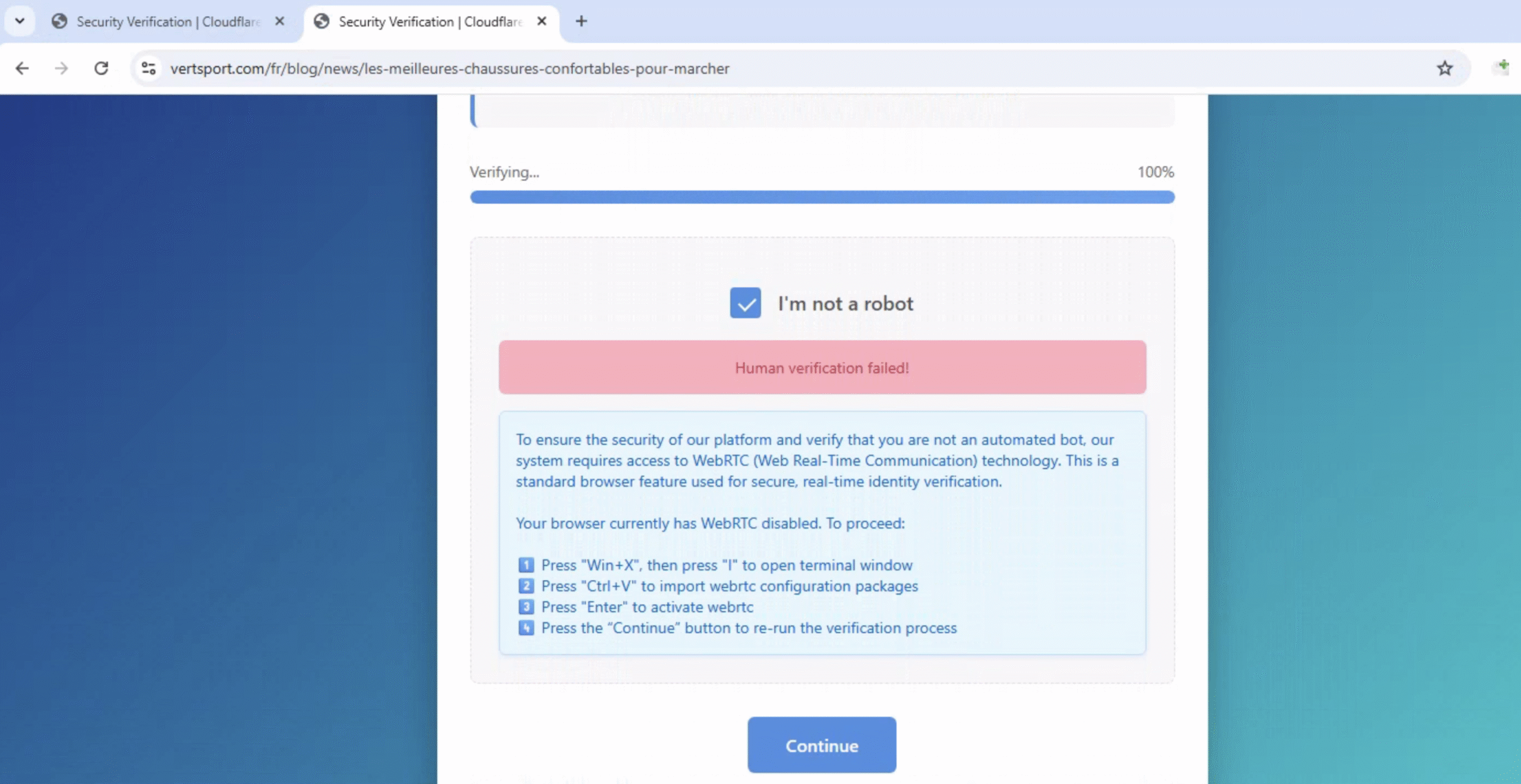
Because the engine inspects the behavior of the page rather than the reputation of the domain, it flagged both sites. The engine analyzed the page’s HTML and detected multiple behavioral signals characteristic of a ClickFix attack: a fake verification prompt, clipboard copy instructions, and system command execution patterns. With enough signals matching simultaneously, it returned a high-confidence malicious verdict, regardless of how trusted the hosting domain was.
Preventing ClickFix Going Forward
ClickFix is evolving fast. We have already detected coordinated campaigns impersonating trusted brands, compromised well-known legitimate websites, and new lure variants designed specifically to bypass traditional defenses. Attackers are investing heavily in making these pages look more convincing and harder to detect.
The ClickFix Engine evolves with the attack. Because it inspects the behavioral fingerprint of the page rather than any single static feature, new lures and obfuscation techniques get caught regardless of how the attack is dressed up.
You may also like

Fake Voicemail Transcript Emails Target 7,800+ Organizations in Large-Scale Credential Phishing

The Inbox Is Disappearing. Why Security Must Follow the Workspace

Check Point Blocks Large-Scale Debt-Relief Email Phishing Campaign Targeting More Than 9,000 Organizations