

Session Revocation Option for Compromised Accounts

Check Point Email Security now allows administrators to automatically revoke active Microsoft 365 user sessions when a compromised account is detected, providing an additional remediation option with minimal disruption to end users.
Compromised accounts pose a significant security risk to organizations. Check Point Email Security uses advanced AI models to detect compromised accounts and automatically remediate threats before they cause damage. As more organizations adopt multi-factor authentication (MFA), attackers increasingly rely on session hijacking to gain unauthorized access without needing to repeatedly log in.
Until now, administrators could automatically block compromised accounts and require users to reset their passwords before regaining access. With this release, a new Revoke Sessions remediation option, available exclusively for Microsoft 365 customers, allows administrators to terminate all active user sessions, requiring users to log in again without resetting their passwords.
This new option is particularly effective against session hijacking attacks, as it invalidates existing sessions while allowing legitimate users to quickly resume their work. For confirmed compromised accounts, blocking the user remains the recommended action. However, for suspected compromises, revoking sessions provides an effective balance between security and user productivity, reducing the impact of automatic remediation on legitimate users.
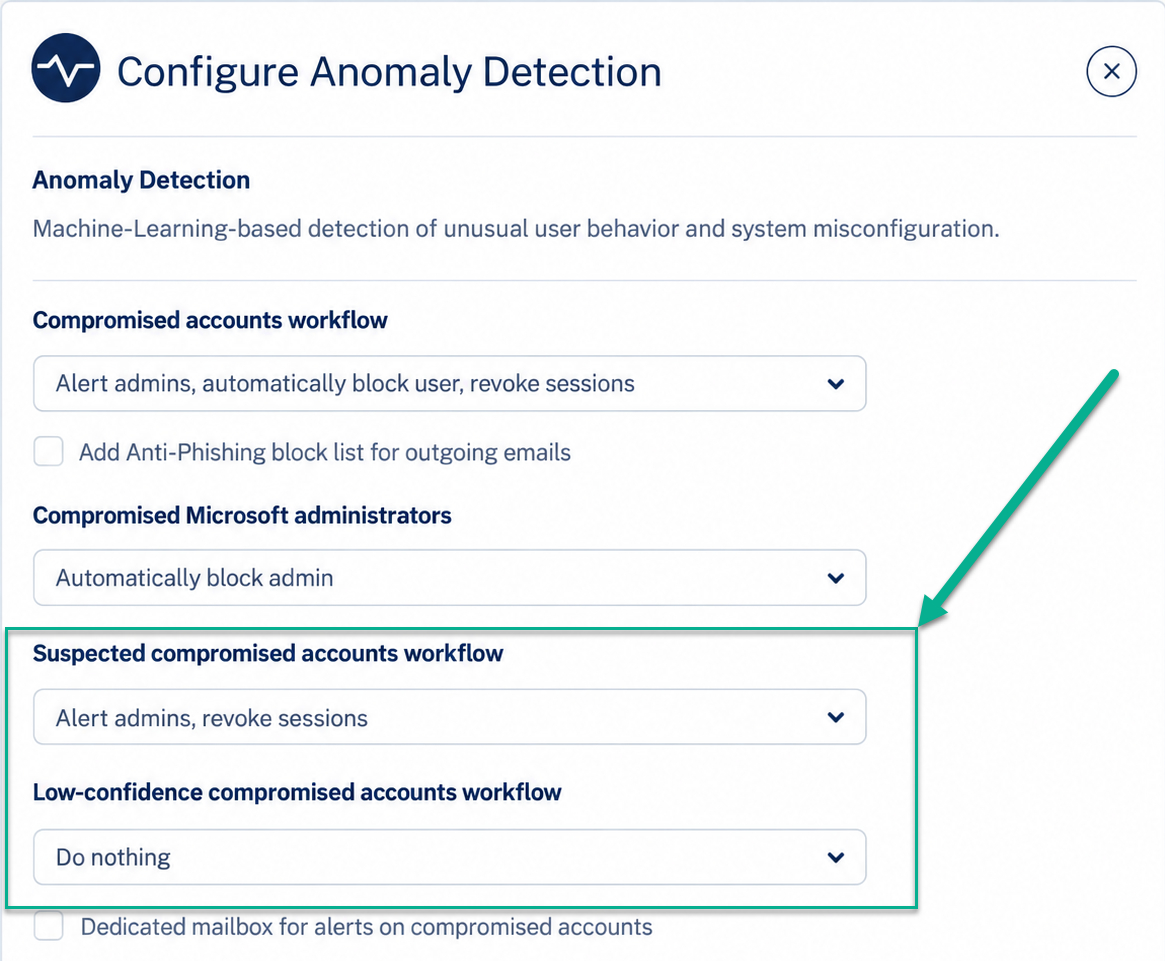
To configure these settings, navigate to Security Settings > Security Engines > Anomaly Detection > Configure.
Administrators can now define separate remediation workflows based on the confidence level of the detection:
- Compromised Accounts – Blocking the user remains the recommended action.
- Suspected Compromised Accounts – Revoking sessions is the recommended action.
- Low-Confidence Compromised Accounts – The recommended action is “Do Nothing,” allowing administrators to track and investigate incidents without generating unnecessary alerts.
The Suspected Compromised Accounts counter on the main dashboard continues to include both suspected and low-confidence compromises. Administrators can distinguish between them using event severity: High for suspected compromises and Low/Medium for low-confidence compromises.
For existing customers, the new workflows will be configured automatically based on their previous settings:
- If the Compromised Accounts workflow was configured to block users, the new Suspected Compromised Accounts workflow will be set to revoke sessions.
- The new Low-Confidence Compromised Accounts workflow will inherit the previous Suspected Compromised Accounts workflow setting.
Note: This feature is being gradually deployed and should be available in customer portals over the next 7 days.
You may also like
Fake Calendar Invites Target Thousands of Organizations in Microsoft Credential-Phishing Campaign

Check Point Blocks Large-Scale Debt-Relief Email Phishing Campaign Targeting More Than 9,000 Organizations

Attackers Are Turning Microsoft’s Trusted Login System Into Their Latest Phishing Weapon