

Get it Done Faster with AI Assist for Check Point SASE

Managing network security can be a daunting task, even for the most seasoned IT professionals. Check Point SASE users now have a new tool at their disposal to streamline these challenges: the AI Assist for Check Point SASE, currently in preview. Trained on our extensive Check Point SASE documentation, AI Assist puts answers to your questions right at your fingertips. Whether you’re configuring firewall rules or managing malware detections, AI Assist provides quick, reliable support whenever you need it.
What is Infinity AI Assist for Check Point SASE?
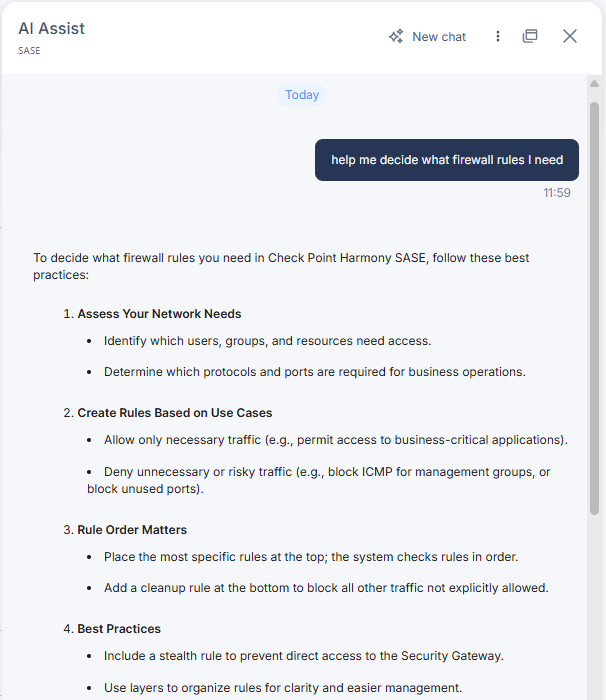
AI Assist for Check Point SASE is an advanced AI chat tool designed to help users streamline their SASE tasks. It’s like having a personal SASE expert available on demand. Need guidance on getting started with a deployment? AI Assist is there for you.
Trained to understand and interpret questions specific to Check Point SASE, AI Assist assists with a wide range of tasks, from setting up new rules and configuring features to troubleshooting and getting detailed insights on best practices. It’s an intuitive assistant that helps streamline your workflows, ultimately saving you time and reducing the need to sift through extensive documentation.
Your On-Demand SASE Expert
With AI Assist for Check Point SASE, you can:
- Get instant help on setup and configuration: Whether you’re new to Check Point SASE or expanding your deployment, AI Assist can walk you through setting up Private Access and Internet Access, adding firewall rules, and configuring other aspects of your network. This means you can get started faster and with more confidence.
- Access best practices with ease: Security configurations often require expert guidance. AI Assist offers recommendations for everyday tasks like assessing and managing firewall or web filtering rules, giving you peace of mind that your network is secured according to industry standards.
- Find information on specific features: Want to know how to import your team from your identity provider? AI Assist can guide you through it, letting you integrate and manage users with ease.
AI Assist Examples
Let’s look at a couple of real-world scenarios.
Scenario 1: Blocking Access to Specific Websites
Suppose you want to block access to a particular site across your organization’s network. With AI Assist, you can get step-by-step guidance on setting up the web filtering rule you need to achieve this. AI Assist explains each step in detail, from accessing the Check Point SASE Administrator Portal to configuring and positioning the rule correctly.
Scenario 2: Handling a Malware Detection
Imagine that you receive a malware detection alert in your Check Point SASE logs. Handling this situation promptly is crucial to prevent any potential spread. AI Assist can provide guidance by outlining the steps you should take following a malware detection such as isolating the affected device, performing a full malware scan, and updating your security policies to mitigate future risks if necessary.
How to Get Started
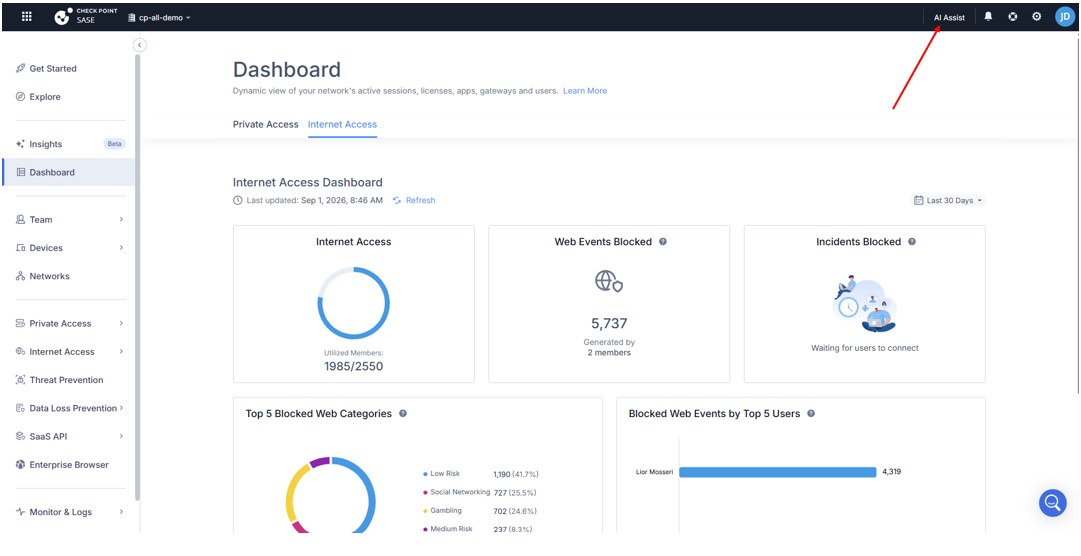
If you’re a current Check Point SASE user, accessing AI Assist is simple. Just log in to the Infinity Portal, navigate to Check Point SASE, click “AI Assist” in the upper right, and start typing your question. The AI Assist will provide you with a detailed response tailored to your query, complete with references to relevant documentation, and step-by-step instructions.
If you’re not sure what to ask, just click the three vertical dots to see commonly asked questions, you can also access other menu options here such as chat export and chat history.
Embrace the Future of Network Security Management
AI Assist is making network security more accessible and manageable for IT teams. It reduces the time and effort required to keep your network secure with on-demand expert guidance helping you to spend less time on network security and more time managing other aspects of your environment.
Whether you’re a new user or a seasoned professional, AI Assist can help maximize the potential of Check Point SASE for your organization. Try the AI Assist today.
You may also like

How Luna Moth Runs Data Extortion Like a Business

SASE in the AI Era: Why Secure Global Connectivity Matters More Than Ever
Security Advisory – Action Required – Active Exploitation of CVE-2026-85102 and a Management Pre-Authentication Vulnerability CVE-2026-93616