

Automatic Localization of Outlook Add-In Experience

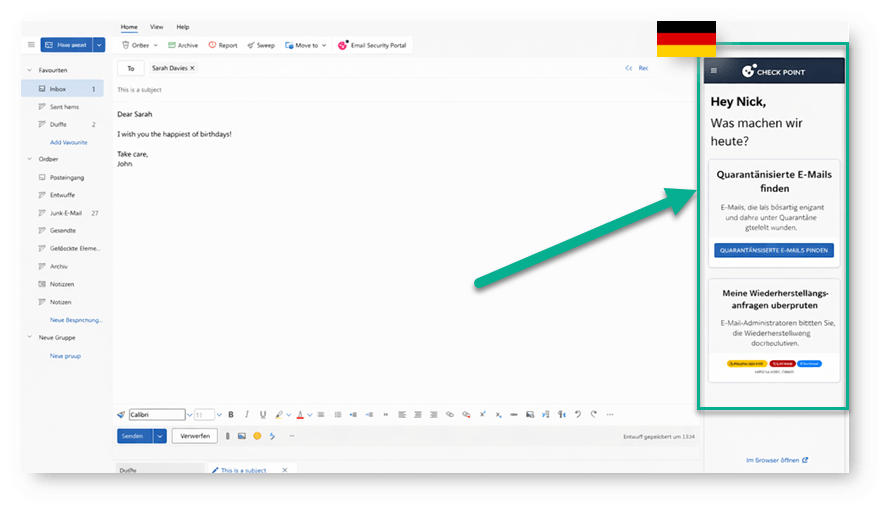
Check Point Email Security now localizes the Outlook Add-In experience based on the language settings configured by the administrator.
The Outlook Add-In is a key part of how end users interact with email security directly from Outlook.
With this update, the experience now follows the localization preferences set under System Settings > Customization > Language.
This helps organizations provide a clearer and more consistent experience across global teams.
Misdirected email notifications, the end user portal that opens inside Outlook, and responses to phishing reports submitted through the Check Point button are now presented in the user’s preferred language, or in the global language defined by the administrator.
This makes security interactions easier to understand and act on, especially for multinational organizations with users across different regions. By presenting guidance, notifications, and responses in the right language, Check Point Email Security helps improve user engagement, reduce confusion, and support faster, safer decisions directly from Outlook.
You may also like

World Password Day 2026: Why “Strong Passwords” Can’t Save You from AI, Infostealers, and the Telegram Underground

SaaS Abuse at Scale: Phone-Based Scam Campaign Leveraging Trusted Platforms

Attackers Continue to Target Trusted Collaboration Platforms: 12,000+ Emails Target Teams Users
