

Exceptions for Attachment/File Cleaning (Threat Extraction)

Exceptions for Attachment/File Cleaning (Threat Extraction) are now available, allowing organizations to define sender-based and file hash-based allow-lists for greater flexibility in how cleaned files are delivered to end users.
Attachment Cleaning, powered by Threat Extraction – Check Point’s Content Disarm and Reconstruction (CDR) engine – is widely adopted by organizations that require an additional security layer beyond sandboxing. It ensures that email attachments and shared files are delivered in a sanitized format, eliminating any potential embedded malware while preserving business usability.
While this level of protection is critical for most communications, certain business scenarios require access to the original file. Teams in finance, legal, or compliance-driven environments may need the unmodified attachment for regulatory or operational reasons. Administrators can now define granular exceptions to the Threat Extraction engine by configuring allow-lists based on specific sender addresses or domains, as well as approved file hashes. This approach enables trusted communications and verified files to bypass cleaning when necessary, while maintaining strong protection across the broader email flow and minimizing disruption to essential business processes.
How to Enable Exceptions for Threat Extraction
To configure exceptions:
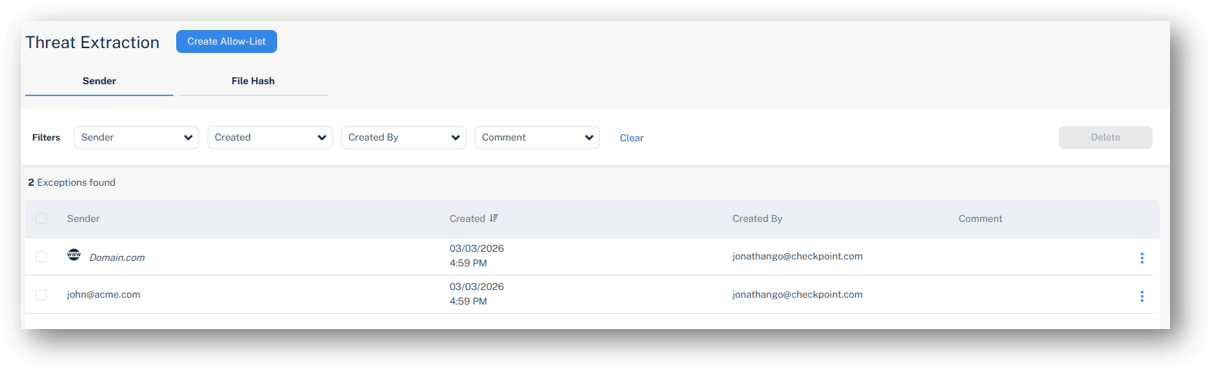
Go to Security Settings > Exceptions > Threat Extraction and define your desired allow-lists:
-
Sender address or domain – Attachments in emails from specified senders or domains will not be cleaned before delivery to end users.
-
File hash – Attachments matching approved hashes will not be cleaned before delivery to end users.
This capability is gradually being deployed and will be available in customer portals over the next 14 days.
You may also like

SaaS Abuse at Scale: Phone-Based Scam Campaign Leveraging Trusted Platforms

Attackers Continue to Target Trusted Collaboration Platforms: 12,000+ Emails Target Teams Users

Phishing Campaign Leverages Trusted Google Cloud Automation Capabilities to Evade Detection
