
Smart Banners for Non-Clean Emails

Harmony Email & Collaboration now allows administrators to apply Smart Banners to emails delivered to end users even when those emails are not classified as clean.
End users often interact with emails that are delivered despite being flagged as potentially risky – such as spam, graymail, suspected phishing, or emails containing password-protected attachments. Until now, Smart Banners could only be applied to emails classified as clean, meaning these delivered messages did not include the additional contextual warnings that help users make safer decisions.
Harmony Email & Collaboration now enables administrators to attach Smart Banners to these delivered emails as well. When emails categorized as Spam, Graymail, suspected phishing, or password-protected attachments are delivered to users – whether to the inbox, junk folder, or another folder – Smart Banners can now provide clear warnings and guidance directly within the message. This improves end-user awareness at the moment of interaction and helps reduce the likelihood of users engaging with potentially malicious content.
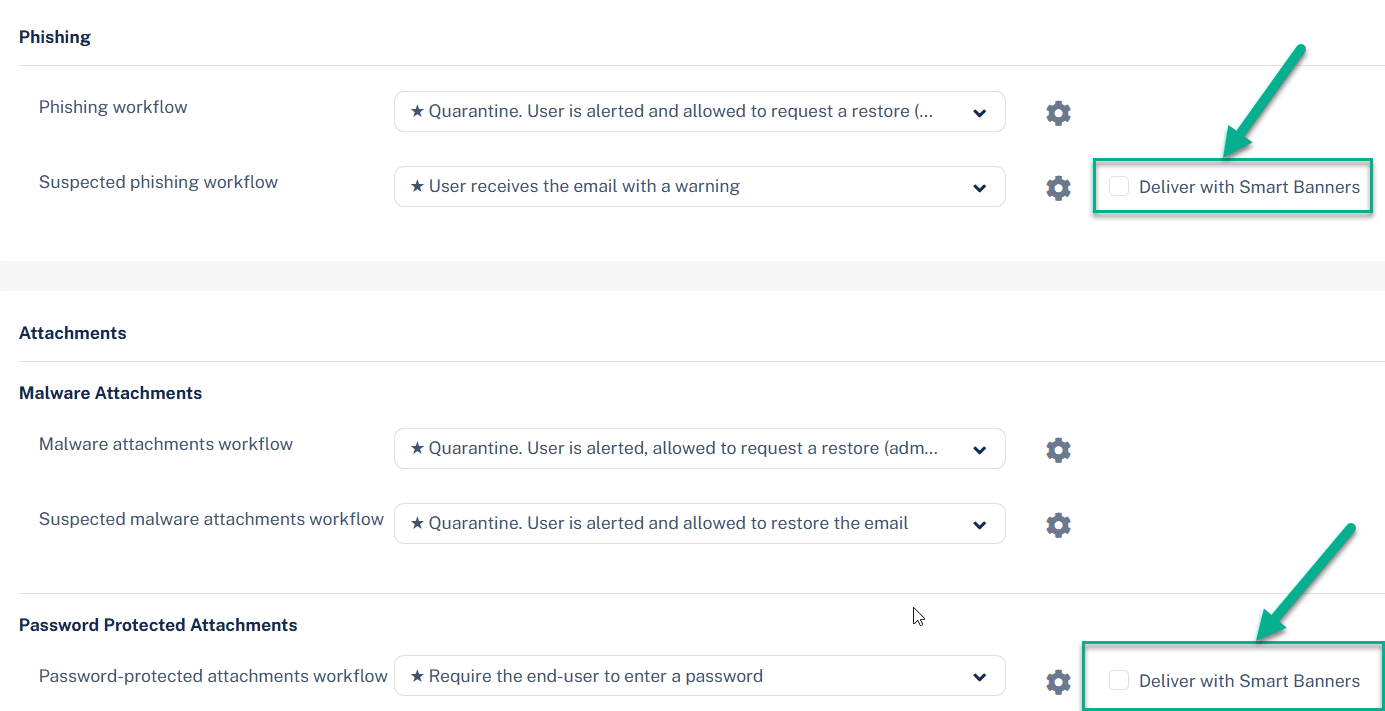
Administrators can enable this capability directly within the email policy workflows. To do so, open the Threat Detection policy for Office 365 Mail or Gmail, select a workflow that delivers the email to end users, and check the “Deliver with Smart Banners” box next to the workflow.
This feature is gradually deployed and should become available in customer portals over the next 7 days.
You may also like

SaaS Abuse at Scale: Phone-Based Scam Campaign Leveraging Trusted Platforms

Attackers Continue to Target Trusted Collaboration Platforms: 12,000+ Emails Target Teams Users

Phishing Campaign Leverages Trusted Google Cloud Automation Capabilities to Evade Detection
